


Using Quarto to Write a Book
I’ve spent the last couple of months revising my Data Visualization book for a second edition that, ideally, will appear some time in the next twelve months. As with the first edition, I’ve posted a complete draft of the book at its website. The production process hasn’t started yet, so it’s not ready to pre-order or anything, but the site has a one-question form you can fill out that asks for your email address if you’d like to be notified with one (and only one) email when it’s available. A lot has changed since the first edition, reflecting changes both in R and ggplot specifically, and in the world of coding generally. I may end up highlighting some of those new elements in other posts. But here, I want to focus on some nerdy details involved in getting the book to its final draft. I’ll discuss Quarto, the publishing system I used, its many advantages, and its current limits with respect to the demands I made of it.
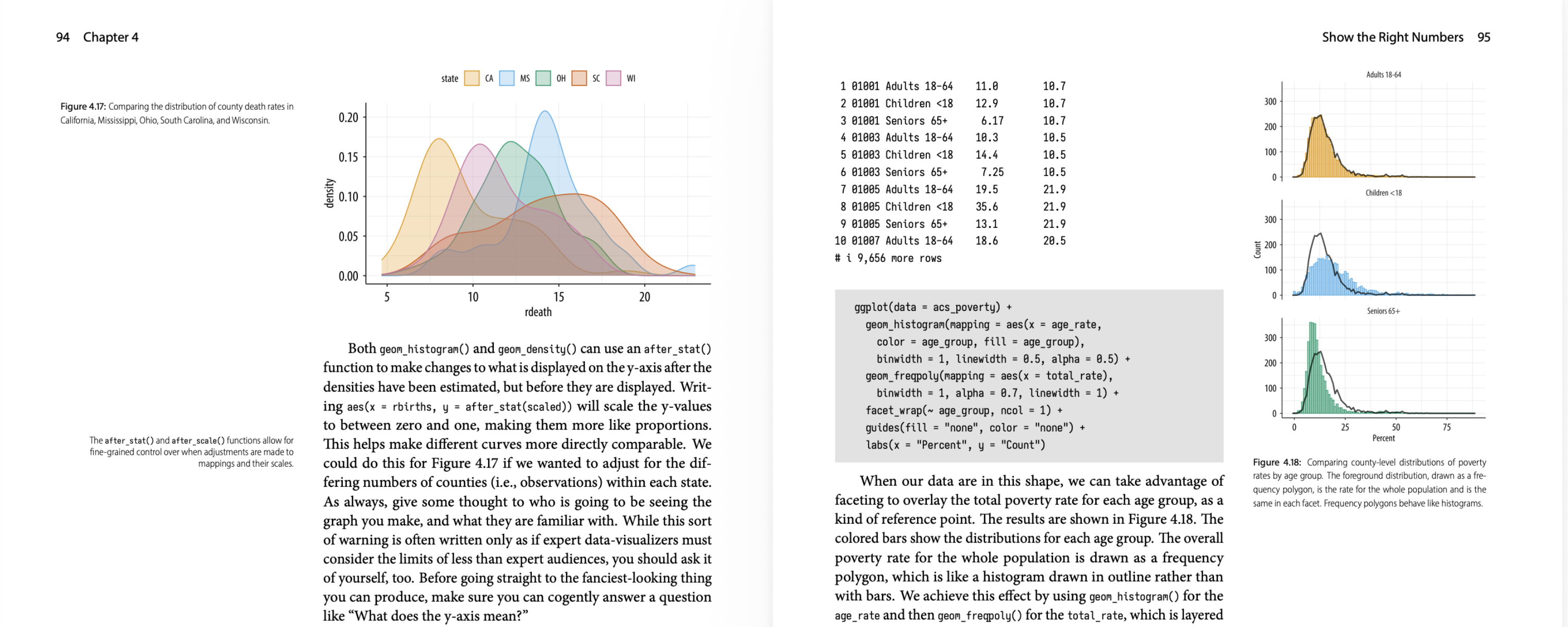
A detail from facing pages in Chapter 4, in the PDF version.
The book is about doing good data visualization using R and ggplot. The book contains many figures, almost all of which are written using the code the book shows and explains.
Reasonable Demands
My baseline list of requirements for the book manuscript was as follows:
- The entire text of the book is in some kind of plain-text format.
- Figures in the book that are the result of R code should be directly produced by R code in the actual document; no cutting and pasting of code snippets and separately-produced figures. Doing that is a recipe for error.
- The scholarly machinery of the book—chapter, section, table, and figure numbering; cross-references; in-text bibilographical references; the bibliography itself and its formatting, and so on—should be automatically handled. No manual numbering and renumbering of figures, etc.
- It should be straightforward to repeatedly generate a fully-formatted and laid-out version of the book manuscript as I go, ideally in any of several output formats (e.g. PDF, HTML), despite it all being written in plain text.
These requirements are reasonable because, for projects like this, working in plain text is the right thing to do. We are writing and revising text and our code; we keep the text in a version control system; we don’t want the results of the code to come apart from the code that generated it; and we need to deliver outputs that consist both of fully-formatted material and replication packages that allow other people do see what we did. PDF is of course the worst, but we still need to target it as one of our output formats.
Despite being reasonable, these requirements are in truth quite demanding. Once you start thinking about what all the pieces entail you realize there’s a lot to keep track of. Systems for doing some or all of this have been developed in whole or in part over the years. Newer ones sometimes escape the constraints of older ones; sometimes they inherit their legacies. I’m not going to review them here. This time around I used Quarto.
Quarto is a publishing system focused on documents of different kinds (articles, presentations, books, websites), written as plain-text sources that mix prose and code in any of several languages (R, Python, Julia, others), destined to be fully-finished outputs in any of several formats (PDFs, HTML, or Word files). Quarto builds on and extends many tools, notably pandoc for getting from Markdown to any number of other output formats. It’s a spiritual descendant of literate programming approaches for dealing with code that needs to be run in the context of prose. In the R world these descendants include Sweave and RMarkdown/knitr. These broadly “notebook” approaches to writing and discussing code have benefits and also sharp limits if your focus is full-on software development and its documentation, or complex data analysis involving many interrelated steps.1 But they’re very useful if you are primarily writing longer-form text that periodically requires things like figures and tables to be programatically generated in a reproducible fashion.
If you just want to know whether you can write long-form projects like articles, books, or websites using Quarto and R, the answer is absolutely yes. A long time ago I wrote parts of my dissertation and several articles using Sweave. A few years ago I wrote the first edition of Data Visualization using RMarkdown. I wrote the second edition using Quarto. Each one was better than the previous version in terms of flexibility and power. Quarto eliminated several pain-points that I had to deal with for the first edition of this book. It’s very well-documented and continually improving. Its defaults are sensible and produce good-looking output. You can stop reading now.
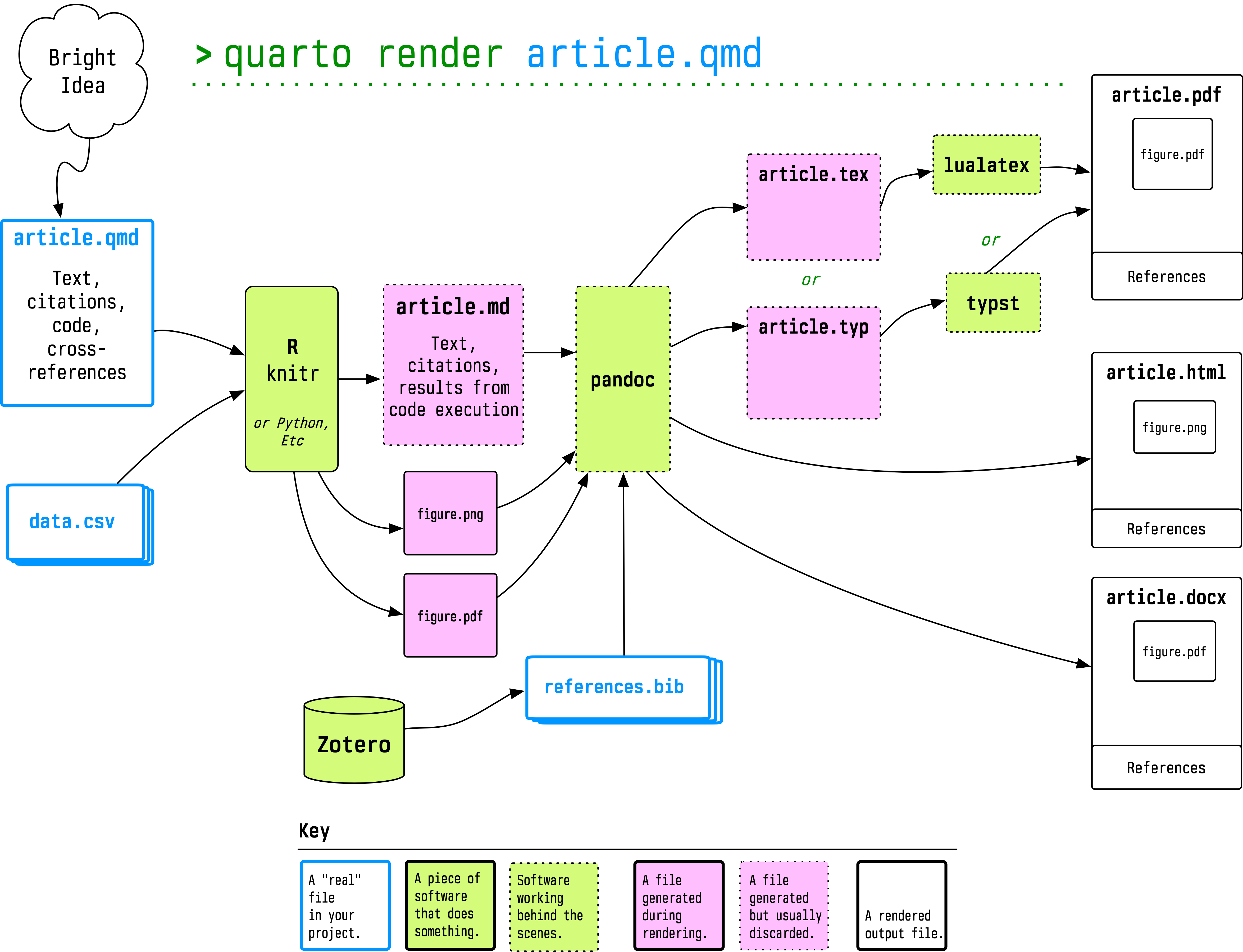
A schematic overview of how Quarto orchestrates its document processing.
Unreasonable Demands
I had a very clear idea about how I wanted the first edition of the book to look
in print. I also knew that I wanted to make it available as a website. I was
fortunate enough to be able to have both of these things work out. This time
around, I did the same again but I really wanted there to be as little as
possible post hoc work with the website version. I knew that wouldn’t be the
case with the PDF, for reasons I will discuss in a moment. I’m pleased that
Quarto performed so well with the whole process. I wrote two pretty
heavily-customized output formats (one for PDF and one for HTML) that specified
the layout of the book. Quarto’s LaTeX-based book pipeline uses the scrbook class from the KOMA-script bundle, which has many nice features, though I find its documentation a tiny bit eccentric. (This might be because I wrote my first book using the memoir class.) I also wrote a couple of R packages that
managed the themes and some other details of how PNG and especially PDF figures
were produced. A version of the theme is in the development version of the
socviz package that accompanies the
book.
The PDF design is a two-column “Tufte-style” layout with wide margins for side-notes and figures. It works very well for a book of this kind as we can show small figures alongside the code that generates them, but also have figures break out of the main text column if needed.

Facing pages with a figure that runs the full width of one of the pages.
A layout like this can’t be rigidly ported over to a website, especially in an era of widely-varying screen sizes. So the HTML version of the book has a broadly responsive layout that arranges things differently at different sizes. Organizing and tweaking it this time around was made a lot easier by Quarto’s much better support for margin notes and marginal figures. It certainly wasn’t without its headaches. Marginal figures and notes are quite annoying to deal with in both HTML and PDF formats, for different reasons. In the PDF case, it’s tricky to get captions right, and there are still a few hacks in there to make it work. But it’s much cleaner than what I had to do in RMarkdown for the first edition, which was in effect a lot of regular expression substitution for things I could only add after the .tex file was produced. That’s gone now.
Here’s a screenshot of a facing page layout with some code, some marginal notes, and two kinds of figures, one in the margin and one full page-width:

Gapminder figures in the PDF version.
And here’s some of the same material as seen on the website:

Gapminder figures in the HTML version
Here’s a direct link to the same section. In the website version the marginal figures appear more marginal. There’s also a little bit of conflict to be worked out between the navigation guides and the marginal notes. In addition, the intrinsic variability of the web layout means that the positioning of the marginal notes is less precisely controllable than it is in the PDF output. But the overall result is pretty good. And I have to say it’s very satisfying to be able to produce a good website and a clean PDF (and also an ePub!) from the same folder of qmd files, with the text written in Markdown, the bibliography managed by Zotero and BBT, interspersed with the code that makes all the figures.
Let the Professionals do a Professional Job
I should say “less precisely controllable without substantial further adjustment”. Because this is the crux of the customization biscuit. There’s no end to it. One of the benefits of being in a position to do a second edition—something I really am very grateful for—is that it allowed me to have a much better sense of the production process for the hard copy of the book. This in turn placed sharp limits on what I was willing to do when it came to customizing the PDF version myself. Camera-ready files for books published by proper Presses are produced in many different ways. My most recent book, which is all prose and no code, was designed and typeset using Adobe InDesign. For the first edition of Data Visualization I sent the Press a set of LaTeX files and PDF image assets. The LaTeX files produced a very good facsimile of the design we’d agreed on. Then the Press’s typesetter got to work on it.
You might think that they just took my files, lightly edited them here and there, and added the trim, bleed, registration, and color marks for the physical print job. That’s not how it went. Book layouts are very hard to get just right, especially layouts that have many different-sized images and notes and other paraphernalia. They’re fragile. Moving something slightly here, or editing a sentence there, can cause a cascade of unwanted effects. Even ordinary pages of text will have issues with excessive or insufficient spacing around paragraph and section breaks, or widows and orphans, or rivers, and many other infelicities that most people won’t notice explicitly, but which cumulatively convey bad vibes even to people who don’t much care about design.
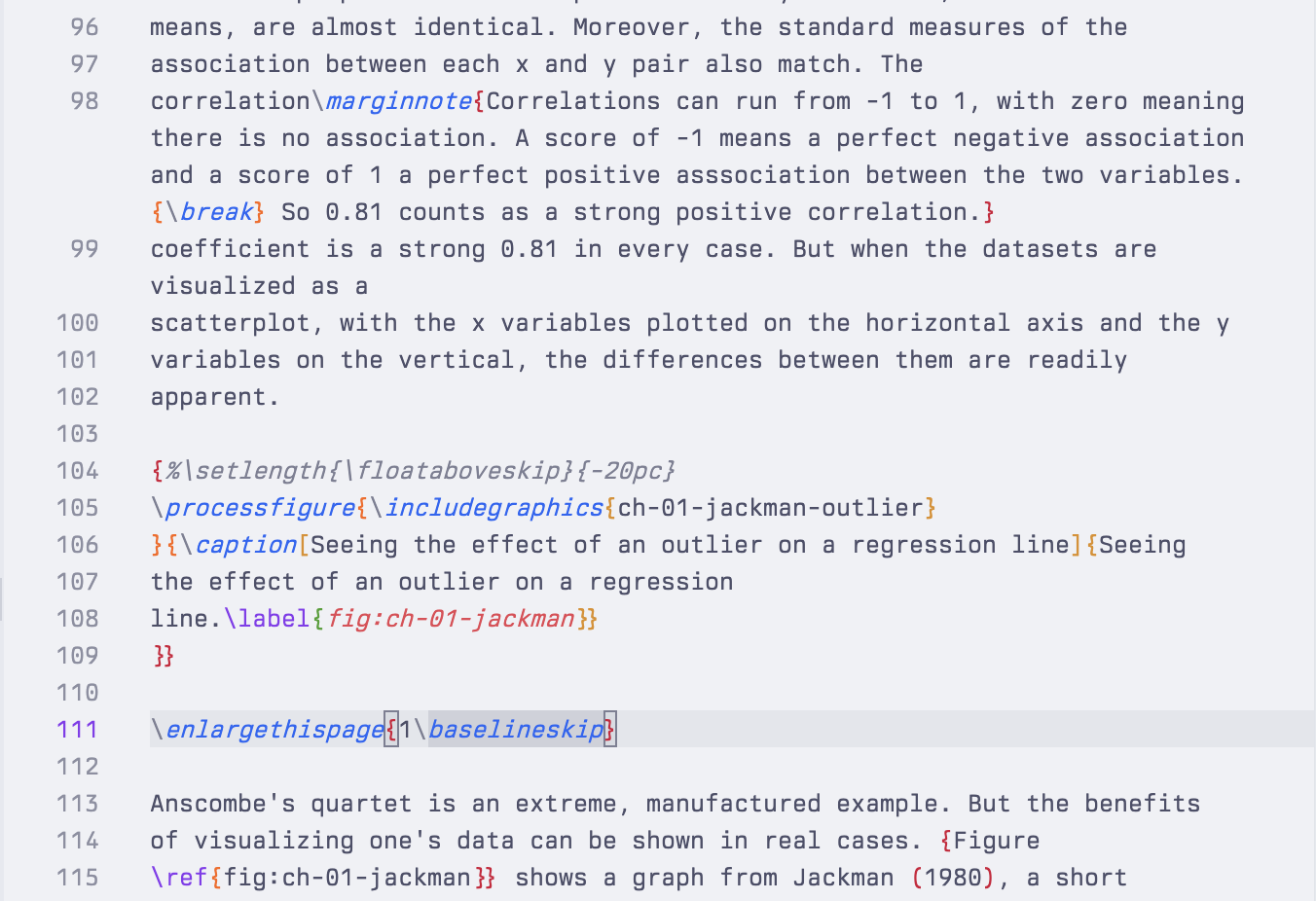
Some of this can be automated. That’s what layout algorithms do. The Knuth-Plass box-and-glue algorithm, which is the thing that causes TeX to emit those Underfull \hbox (badness 10000) complaints, is a real marvel. But it can’t quite work miracles. In my case, the professional typesetter took my LaTeX file, threw away my document class and substituted their own custom one (and some custom style files). Like any document class it defined the layout and all the features of the book, but it also included a variety of commands that allowed her to finely adjust the text as needed on any particular page. Tightening up the spacing here; forcing a break there; very slightly expanding or contracting the page size when needed to make sure that the layout didn’t break in a visible way on the next page, and so on. Here’s an example from the first edition:
And another:

Those uses of {\break}, \enlargethispage, \vspace{}, and the non-breaking space in this~way are all done by hand, based on rendering and re-rendering the document as it’s built to make sure each page meets the Press’s standards. An automatically-produced PDF can get you eighty five or ninety percent of the way to this but, if you really want to get things right, that last stretch will inevitably mean a bunch of adjustment by hand in whatever the final format is. That’s not something you can incorporate into your reproducibility pipeline.
Fortunately, you don’t need to. Most of the time we don’t require anything like that level of attention to detail. It’s worth producing and circulating material in accessible and readable formats that also don’t look like garbage. And it’s gratifying to be able to reliably generate pretty high-quality versions of those outputs from plain-text sources. That’s more than good enough in almost all cases. When writing papers that end up as PDFs, for example, I use a template that’s almost 20 years old. I only touch it when something breaks. By the same token, while my amateur interests compel me to run up polished custom Quarto book formats for my book projects, I also know that the people who set type for a living know a lot more about the fine grain of that work than I know, or need to know. But once in a while it’s nice to see how far you can push things.
-
The trick is to have the code chunks in your document be short and sweet, and have structured scripts and properly-documented packages manage the heavy lifting in any analysis. ↩︎